Scheduled automatically
Backup jobs run on a defined schedule, helping protect data consistently without depending on manual steps.
SecureStore protects files, servers, and workstations with scheduled local and online backups, encrypted offsite storage, and full-system image backup capabilities.
Use fast local recovery and secure online retention together, while email reporting and policy controls keep the backup process visible and predictable.
Backup jobs run on a defined schedule, helping protect data consistently without depending on manual steps.
Store a local copy for rapid recovery and an encrypted online copy for protection from site-level loss.
Create image backups for complete system recovery, including bare-metal restoration when a machine must be rebuilt.
Email status reports and retention policies help preserve useful recovery points and identify jobs needing attention.
Protection without constant attention
SecureStore combines automation, reporting, retention controls, and encrypted offsite storage so that backup is a routine process rather than an emergency project.
Run backup jobs automatically on a regular schedule, reducing dependence on someone remembering to start them manually.
Receive backup status and job notifications by email so failures can be identified instead of remaining unnoticed.
Control how long backup versions are kept, creating useful recovery points while managing long-term storage requirements.
Keep backup copies on local or network storage for rapid restores and an additional layer of operational protection.
Send an encrypted copy to secure offsite storage so local hardware or facility incidents do not eliminate every recovery path.
Create complete system images for disaster recovery and bare-metal restoration when an entire machine must be rebuilt.
How it works
SecureStore combines local speed and offsite resilience: select what matters, choose the destinations, automate protection, and restore at the level the incident requires.
Protect individual business data, selected volumes, or a complete system image according to recovery needs.
Use local storage for fast access and encrypted online storage for independent offsite protection.
Automate the jobs, encrypt online data before transmission, and apply the retention policy you need.
Recover selected data for routine incidents or use an image backup for complete bare-metal recovery.
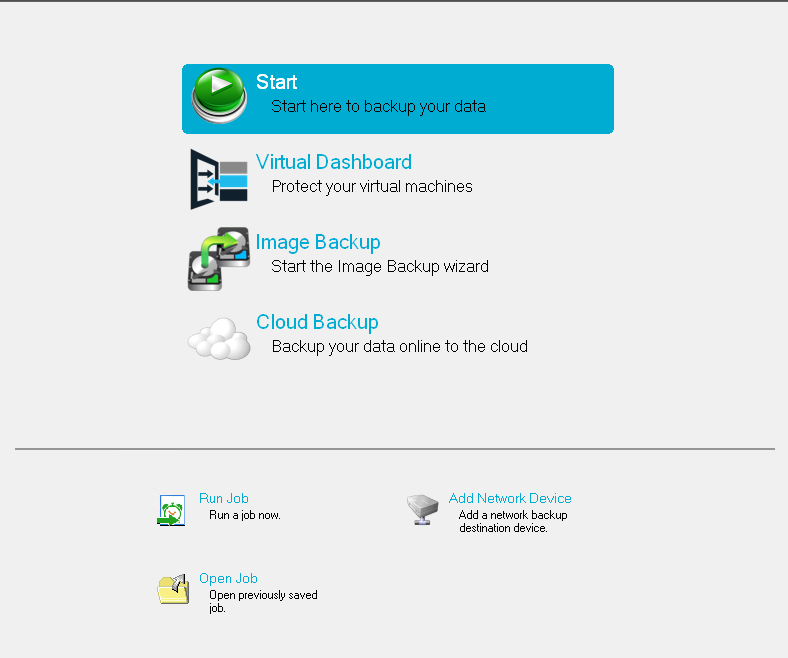
Actual SecureStore interface. The displayed tools include online backup, image backup, job execution, and network backup destination support.
More than file copy
SecureStore is a full backup platform rather than a limited cloud-upload utility. It can maintain local and online backups together and create image backups for recovery when an entire system must be restored.
Use local or network-attached backup storage when rapid access and shorter restore times are the priority.
Keep an encrypted online copy independent of the protected system and its physical location.
Capture a complete system image instead of protecting only selected files and folders.
Use a suitable image backup to rebuild a failed or replaced system from the operating system upward.
Recovery readiness
SecureStore is not an anti-malware product, but it can help reduce the financial and operational damage caused by ransomware and other destructive events by preserving recoverable backup copies away from the affected system.
Privacy by design
SecureStore encrypts protected data with 256-bit AES before the data leaves your server or workstation. There is no universal recovery key and no backdoor key retained for convenience.
Secure offsite infrastructure
SecureStore backup servers are located in a secure Los Angeles data center, physically separating backup copies from the systems and facilities they protect.
Common questions
SecureStore is designed to make recoverable, encrypted, offsite backup a routine part of data protection.
No backup product prevents malware from reaching a system. SecureStore helps with recovery by keeping retained backup versions offsite, allowing an organization to restore data from a point before the ransomware event when a suitable version is available.
No. There is no backdoor or universal recovery key. This protects customer privacy, but it also means that a lost key can make the encrypted backup unusable.
SecureStore backup servers are located in a secure data center in Los Angeles, California.
Backup jobs can send email notifications and reports, making it easier to identify completed jobs and failures that require attention.
Retention policies determine how long backup versions remain available. Policies can be selected to match operational recovery needs and storage requirements.